Graph Paper Handwriting Generator
Create handwritten-style pages on graph paper
Use a grid-focused editor with graph paper, A4 sizing, black ink, and structured spacing selected by default for lab records and text-based math or science notes.
Graph Paper Tool
Create structured graph-paper handwriting
Quick presets
43 words detected. Preview updates after you pause typing.
There is no fixed text limit. For faster previews, work in sections when a document reaches several thousand words, and use low or medium PDF quality on memory-limited phones.
Math lines with $$Centered display lines for formulas.
Wrap any formula in double dollar signs, like $$x^2 + 2x + 1 = 0$$, and it becomes a centered display line with roomy spacing — handy for worksheets and revision notes. You can mix math with normal text: the $$...$$ part gets its own line wherever it appears in a paragraph.
Math lines are drawn in your handwriting font; this is not typeset LaTeX, so fractions, square roots, and stacked symbols will not render as textbook notation — write them in plain text (for example (a+b)/2 or sqrt(x)). Very long formulas shrink to fit the page width. Math lines work with every paper type and are included in PNG, JPG, and PDF exports.
Handwriting Style
TTF or OTF up to 5 MB. Your font is loaded in this browser only and stays available for this session. Uploaded fonts are used for the preview and are included in PNG, JPG, and PDF exports.
How to use custom fonts
Pick a .ttf or .otf file from your device and it appears above as a new style card marked “Custom”, already selected. Type as normal — the preview, PNG, JPG, and PDF exports all use your font exactly like the built-in styles.
Uploaded fonts live in this browser tab only: refresh the page and you will need to upload again. Remove a font any time with the × on its card. Only upload fonts you have the right to use — many free fonts allow personal use but restrict sharing, so check the license if you plan to distribute your exports.
If an upload fails, check the file really is a .ttf or .otf (not a renamed document) and is under 5 MB. On phones, use the system file picker rather than a cloud drive preview if the first attempt fails.
>Advanced SettingsFine-tune margins, paper brightness, tilt, and handwriting variation.
More formats
Export only content you created or have permission to use. Do not use generated pages to misrepresent authorship, identity, records, or assessed work. See our responsible-use guidance.
Preview
Real-time handwritten pages
The preview contains 1 handwritten-style pages generated from the text editor. Decorative paper lines and text positioning are represented in the preview images.
Title: Weekly Planning Notes
This preview shows how your typed notes can become a readable handwritten-style page.
Adjust paper, spacing, margins, ink color, and style before exporting.
Use it for notes, worksheets, journal drafts, printables, and design previews.
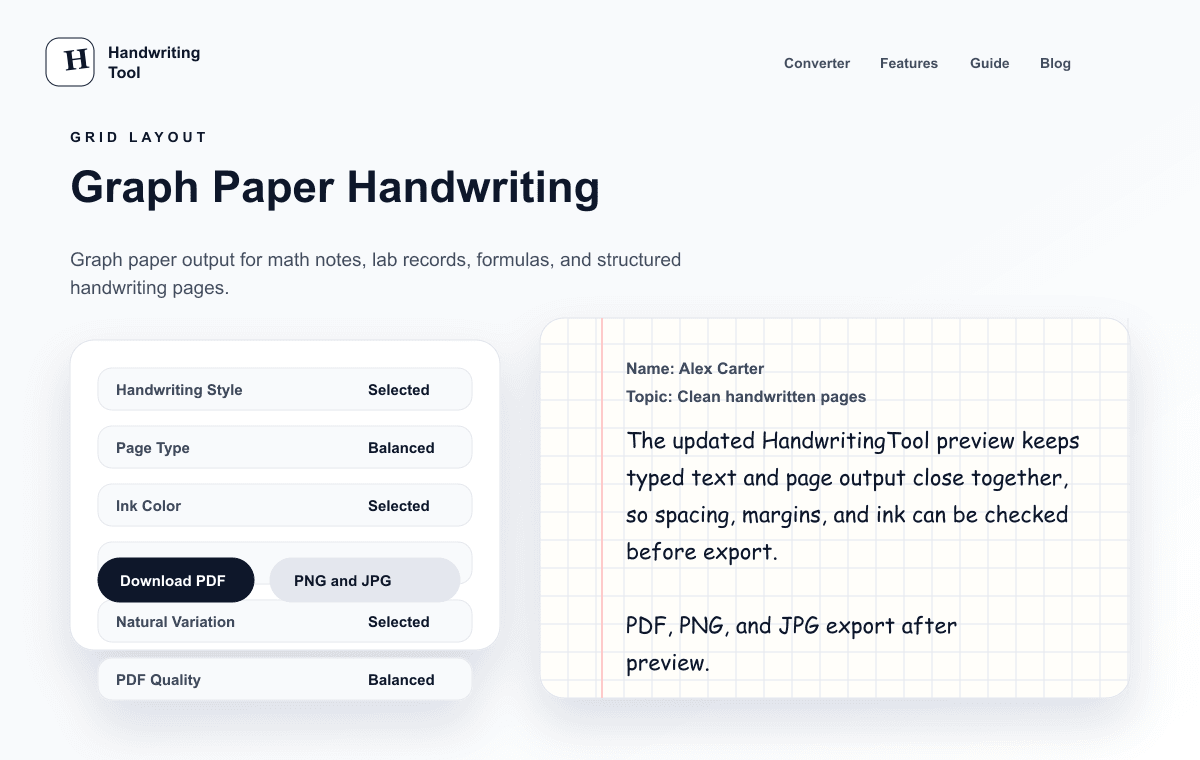
Current Output Example
What this focused tool creates
Current graph-paper preset showing readable text over a printable grid.
- Structured grid-paper preset
- Spacing controls for readable labels
- PDF, PNG, and JPG export
How to use this tool
- Enter plain-text observations, steps, labels, or structured notes.
- Keep graph paper selected or adjust the page size and handwriting style.
- Tune spacing and margins so the writing remains clear against the grid.
- Preview the complete layout and export it as PDF, PNG, or JPG.
Recommended settings
- Lab record
- Graph paper, black ink, medium text, low variation
- Structured revision
- Graph paper, blue or black ink, short sections
- Printing
- A4 or Letter to match the printer, medium PDF quality
Math and science note use
The grid provides visual structure for labels, observations, short calculations, and lab notes. Add complex equations, charts, and diagrams separately when the page requires them.
Current limitations
This tool does not solve equations, parse LaTeX, understand mathematical meaning, or draw diagrams. It renders the plain text you provide over a graph-paper background, so verify every symbol in the preview.
Privacy and next steps
The text-to-page rendering happens in your browser. HandwritingTool does not receive the note text for conversion, although normal analytics, hosting, and security telemetry may still apply to the website.
In-depth guide
Graph Paper Deep Dive: Structured Notes, Lab Records, and Organized Study Pages
Graph paper is the right choice when alignment matters more than prose. If your pages are mostly labels, measurements, short steps, or lists, the grid keeps every line visually anchored so the page stays scannable at a glance. It is less suited to long essays — for continuous writing, lined paper reads more naturally — but for structured material it beats a blank page every time.
Start with clean plain text: short lines, one idea per line, and blank lines between blocks. Open the graph-paper tool and keep the defaults — graph paper, A4, black ink — unless you have a reason to change them. Choose a readable handwriting style rather than a decorative one; on a grid, flamboyant letterforms fight the lines instead of flowing with them. Set a medium text size with low variation so characters sit evenly, and open the line spacing slightly so descenders do not collide with the row below. Preview the full page before exporting: the grid should sit quietly behind the text, not compete with it.
Lab records are the classic use case. Write the date, aim, materials, and method as short headed sections, then log observations line by line — the grid keeps columns of readings roughly aligned without any table formatting. Because the tool renders plain text, describe simple results in words, for example noting that a temperature rose two degrees per minute, rather than expecting drawn charts. Export the finished set as a PDF so the page order and grid scale stay fixed for printing or filing.
Math and science revision works the same way: one concept per block, formulas on their own lines, and worked steps numbered down the page. Keep symbols simple and verify every character in the preview — the tool does not understand mathematical meaning, so a misread minus sign is yours to catch. For anything beyond text, such as actual plots, geometric diagrams, or chemical structures, draw them separately and combine the pages afterwards.
The grid also makes an excellent lightweight planner. Daily checklists, habit trackers, project task lists, and vocabulary sets all benefit from the implicit columns: write the item on the left and the status, date, or translation on the right. Short entries plus consistent spacing produce a printable page that looks deliberately organized rather than improvised.
Before printing, match the digital page size to your printer paper — A4 or Letter — and use medium PDF quality, which balances sharpness and file size for grid pages. Print one test page first: grids reveal margin problems faster than lined paper does, and a page that looks fine on screen can feel cramped on paper. If it does, widen the margins or split the content across two pages rather than shrinking the text.
If text crowds the grid, resist the urge to shrink the font. Increase line spacing first, then widen the margins, and only then consider splitting the content. Small text on a dense grid is the most common reason a graph-paper page looks messy — the fix is almost always more whitespace, not smaller letters. Black ink gives the sharpest print result, while blue works if the tone is dark enough.
Two final choices shape the result more than any other. First, grid density: the default grid suits most notes, but if your handwriting runs large, open the spacing rather than fighting small squares — letters that straddle grid lines look accidental. Second, variation: a little variation keeps pages feeling human, but on graph paper high variation makes aligned lists look ragged, so keep it low for anything structured. Save these preferences mentally as your personal preset: graph paper, A4, black ink, medium size, low variation, slightly open spacing. Return to it every time, and every graph-paper page you produce will look like it came from the same careful notebook.
Frequently asked questions
Can I make printable graph-paper handwriting pages?
Yes. Select the matching paper size, preview the grid and text, then export a PDF for printing.
Does the tool solve math or render LaTeX?
No. It renders plain text on a grid and does not provide mathematical intelligence or LaTeX typesetting.
Can I download graph-paper pages as images?
Yes. PNG and JPG are available alongside PDF export.