Lined Paper Handwriting Generator
Create handwriting on lined paper
Type or paste your text into a notebook-focused editor with lined A4 paper, readable spacing, and a visible left margin selected by default.
Lined Paper Tool
Create handwriting on lined paper
Quick presets
34 words detected. Preview updates after you pause typing.
There is no fixed text limit. For faster previews, work in sections when a document reaches several thousand words, and use low or medium PDF quality on memory-limited phones.
Math lines with $$Centered display lines for formulas.
Wrap any formula in double dollar signs, like $$x^2 + 2x + 1 = 0$$, and it becomes a centered display line with roomy spacing — handy for worksheets and revision notes. You can mix math with normal text: the $$...$$ part gets its own line wherever it appears in a paragraph.
Math lines are drawn in your handwriting font; this is not typeset LaTeX, so fractions, square roots, and stacked symbols will not render as textbook notation — write them in plain text (for example (a+b)/2 or sqrt(x)). Very long formulas shrink to fit the page width. Math lines work with every paper type and are included in PNG, JPG, and PDF exports.
Handwriting Style
TTF or OTF up to 5 MB. Your font is loaded in this browser only and stays available for this session. Uploaded fonts are used for the preview and are included in PNG, JPG, and PDF exports.
How to use custom fonts
Pick a .ttf or .otf file from your device and it appears above as a new style card marked “Custom”, already selected. Type as normal — the preview, PNG, JPG, and PDF exports all use your font exactly like the built-in styles.
Uploaded fonts live in this browser tab only: refresh the page and you will need to upload again. Remove a font any time with the × on its card. Only upload fonts you have the right to use — many free fonts allow personal use but restrict sharing, so check the license if you plan to distribute your exports.
If an upload fails, check the file really is a .ttf or .otf (not a renamed document) and is under 5 MB. On phones, use the system file picker rather than a cloud drive preview if the first attempt fails.
>Advanced SettingsFine-tune margins, paper brightness, tilt, and handwriting variation.
More formats
Export only content you created or have permission to use. Do not use generated pages to misrepresent authorship, identity, records, or assessed work. See our responsible-use guidance.
Preview
Real-time handwritten pages
The preview contains 1 handwritten-style pages generated from the text editor. Decorative paper lines and text positioning are represented in the preview images.
Title: Weekly Planning Notes
This preview shows how your typed notes can become a readable handwritten-style page.
Adjust paper, spacing, margins, ink color, and style before exporting.
Use it for notes, worksheets, journal drafts, printables, and design previews.
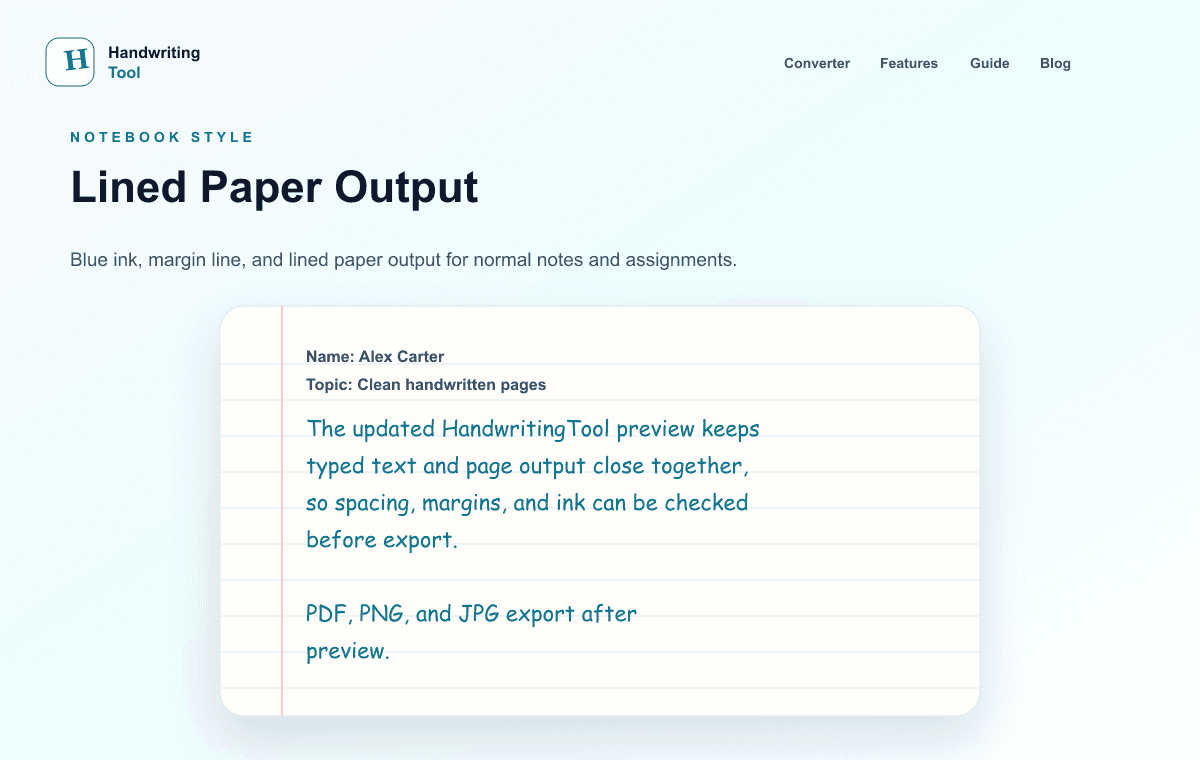
Current Output Example
What this focused tool creates
Current lined-paper output with blue ink, ruled baselines, and a visible left margin.
- Notebook-ready ruled layout
- A4 and Letter page sizes
- Current page or complete PDF export
How to use this tool
- Enter your notes, letter, worksheet text, or paragraph in the editor.
- Choose a readable handwriting style and keep lined paper selected.
- Adjust font size, line spacing, word spacing, margins, variation, and ink.
- Review every page, then download the current page or all pages as PDF, PNG, or JPG.
Recommended settings
- Notebook notes
- A4, lined paper, blue ink, medium size, slightly open spacing
- Clean printing
- A4 or Letter to match the printer, black ink, medium PDF quality
- Room for annotations
- Keep the margin line and use a wider left margin
Printing and export
Choose the same page size as your printer and test one page at actual size. PDF keeps multi-page layouts together; PNG is best for a sharp single page, while JPG creates a smaller image.
Current limitations
The tool renders typed text with preset handwriting styles. It does not copy your own handwriting, understand document formatting, or guarantee perfect alignment for every style. Preview the ruled baseline before export.
Privacy and next steps
Handwriting text is rendered in your browser and is not sent to a HandwritingTool application server for conversion or storage. Website analytics, hosting, and security services may still process technical usage data.
Frequently asked questions
Can I create handwriting on lined paper for free?
Yes. Enter text, adjust the lined-paper settings, preview the pages, and export without creating an account.
Can I use A4 and Letter paper?
Yes. Select A4 or Letter in the page-size control before rendering and printing.
Which export is best for printing?
PDF is usually best for printing and multi-page output. Test one page at actual size first.