Guides • May 11, 2026
Text to Handwriting on Lined Paper
Convert text to handwriting on lined paper with notebook-style settings, spacing recommendations, margin checks, examples, and PDF export tips.
Written by admin · Updated August 1, 2026
Text to Handwriting on Lined Paper: Create Notebook Pages Online
Converting text to handwriting on lined paper is useful when you want typed content to look like a clean notebook page. Lined paper gives the writing structure, keeps paragraphs easier to read, and creates a familiar page style for notes, drafts, worksheets, and handwritten-style documents.
This guide focuses only on the lined-paper workflow. Start in the lined paper handwriting generator. For broader page creation, read how to convert text to handwriting; for downloadable documents, use the PDF export guide; for study material, open the handwritten notes generator.
What Is Text to Handwriting on Lined Paper?
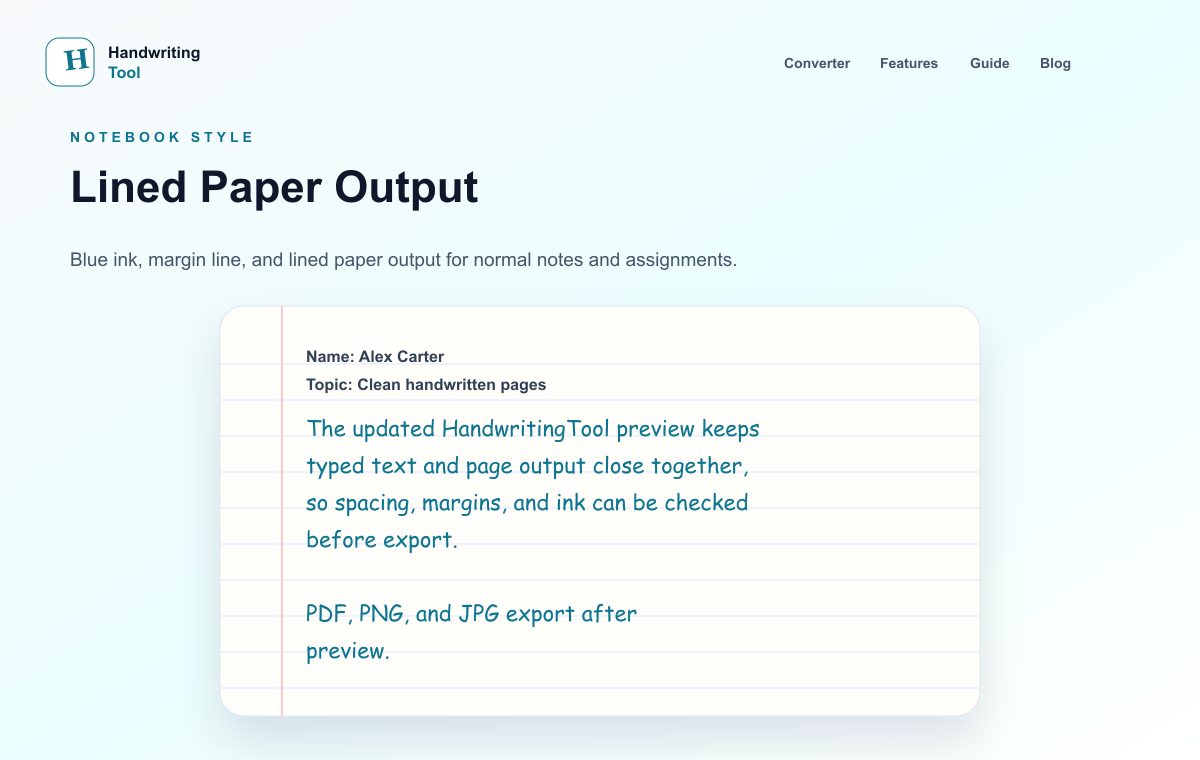
Text to handwriting on lined paper means taking typed text and placing it onto a ruled notebook-style page with handwriting-style letters. The result is not just a font change. A good lined paper page also needs proper spacing, margins, line height, ink color, and page size.
This type of output is useful when the page should feel like normal notebook writing. The lines guide the eye and make the handwritten text look more organized than it would on a plain white background.
A lined paper handwriting page usually includes:
- Blue or black handwriting-style ink
- Horizontal notebook lines
- A natural left margin
- Comfortable top spacing
- Medium font size
- Balanced line spacing
- Short paragraphs or clear sections
- PDF, PNG, or JPG export
Unlike the broader converter guide, this article concentrates on baseline alignment, ruled-paper spacing, margins, and printing. It does not repeat every general handwriting-style setting.
When Should You Use Lined Paper?
Lined paper is best when readability and structure matter. It works especially well for content that would normally be written in a notebook.
Use lined paper for:
- Class notes
- Revision pages
- Notebook-style drafts and planning pages
- Worksheet examples
- Practice writing pages
- Study summaries
- Paragraph answers
- Printable notebook pages
Lined paper helps the page feel familiar. It also prevents the output from looking like floating handwritten text on a blank digital canvas.
For study-focused pages, read the handwritten notes generator guide. If the page will be printed, set the dimensions with the A4 handwriting guide and review the PDF export checklist. For broader layout advice, use the realistic handwriting checklist.
If your source text is typed class notes, the typed notes to handwritten notes guide gives a faster note-focused workflow.
Lined Paper vs Blank Paper vs Graph Paper
Choosing the right paper style matters because each paper type creates a different feeling.
Lined paper is best for normal writing. It supports paragraphs, notes, study pages, and notebook-style pages. If the content has sentences and sections, lined paper is usually the safest choice.
Blank paper is better for letters, clean documents, title pages, short messages, or content that should look less like schoolwork. It gives the page a cleaner look, but it can feel empty if the text is long.
Graph paper is better for math, science, lab notes, diagrams, calculations, tables, and structured examples. It can look strange for normal paragraphs, but it works well when the content has numbers or technical layout.
If your goal is a realistic notebook page, start with lined paper. If the page feels too busy, try blank paper only after testing the lined version.
How to Create Notebook-Style Handwriting Pages Online
You can create lined paper handwriting pages directly in the browser with HandwritingTool.
Step 1: Prepare the Text
Start with clean text. Remove extra spaces, fix spelling mistakes, and split long paragraphs. Notebook-style pages look better when the content has natural breaks.
Before pasting the text, check:
- Is the text easy to read?
- Are paragraphs too long?
- Do you need headings?
- Are there repeated lines?
- Is the wording final enough to export?
If the source text is messy, the handwritten page will also look messy.
Step 2: Open the Converter
Open the focused lined paper handwriting tool. It starts with ruled A4 paper, notebook spacing, and a visible margin already selected; paste your text and review the live preview.
The preview is important because lined paper pages depend on alignment. Do not download immediately. Check how the handwriting sits on the ruled page first.
Step 3: Select Lined Paper
Choose lined paper from the paper options. This gives your page a notebook-style background and helps the handwritten text feel placed on a real page.
Lined paper is usually best for:
- Paragraph answers
- Class notes
- Revision summaries
- Notes-style pages
- Printable handwriting output
If your content includes diagrams or calculations, graph paper may be better. If your content is a letter, blank paper may be better.
Step 4: Choose a Readable Handwriting Style
For lined paper, choose a simple handwriting style. Decorative cursive may look nice in a short sentence, but it often becomes hard to read across a full page.
A good lined paper handwriting style should have:
- Clear letters
- Natural spacing
- Comfortable height
- No extreme slant
- Good readability in full paragraphs
For more detail, see the guide to best handwriting fonts for study pages. The same readability rule applies to notebook pages.
Step 5: Adjust Font Size and Line Spacing
Font size and line spacing matter more on lined paper than on blank paper. If the handwriting is too large, it may sit awkwardly between the lines. If it is too small, the page may look compressed.
Start with medium font size. Then adjust line spacing until the text feels comfortable on the ruled page.
Good lined paper settings usually look like this:
- Medium font size
- Slightly open line spacing
- Normal word spacing
- Blue or black ink
- Left margin enabled
- Top margin with enough breathing room
Avoid extreme settings. Lined paper looks most natural when the writing feels steady and readable.
Step 6: Check the Margins
Margins make the page look like a notebook instead of a generated image. A left margin is especially useful because many real notebooks have margin space.
Check that:
- The writing does not start too close to the left edge
- The first line does not start too high
- The text does not touch the page border
- Paragraphs have enough room
- The final page does not feel crowded
Margins are a small detail, but they make a big difference for realistic handwritten pages.
Step 7: Preview the Full Page
Preview the complete page before downloading. Do not judge the result from one line only. Lined paper output can look good at the top and crowded near the bottom if the text is too dense.
Look for:
- Lines that feel too tight
- Text running too close to the margin
- Font size that feels too big
- Paragraphs that should be split
- Ink color that prints poorly
- Page output that feels crowded
If something looks off, edit the text or adjust the settings before export.
Step 8: Download as PDF, PNG, or JPG
Once the lined paper preview looks clean, download the output. For notebook-style pages, PDF is the best choice because it keeps pages together and preserves the ruled layout. For a detailed comparison of export formats and print settings, see the A4 handwriting guide.
Best Settings for Lined Paper Handwriting
The best settings depend on your content, but these starting points work well for most notebook-style pages.
| Setting | Recommended Choice | What to Check |
|---|---|---|
| Paper | Lined | Text should sit naturally between lines |
| Ink | Blue or black | It should print clearly |
| Font size | Medium | Letters should not touch the line above |
| Line spacing | Slightly open | Paragraphs should not feel packed |
| Margin | Left margin enabled | Text should not start too close to the edge |
| Export | Best for printing notebook pages |
Use medium font size. Very small handwriting can be hard to read, while very large handwriting may not fit naturally between the lines.
Use blue or black ink. These colors look familiar for notes and study pages. Bright colors can make the page feel less natural.
Use normal or slightly open line spacing. Tight spacing can make the handwriting look crowded. Too much spacing can make the page look empty.
Use a left margin. A margin gives the page a real notebook feel and keeps the writing organized.
Use shorter paragraphs. Lined paper looks better when the text is broken into readable sections.
For page-size and print-setup details, follow the A4 handwriting guide — this page stays focused on the notebook layout itself.
If realism is your main goal, read the realistic handwriting checklist.
Example Lined Paper Workflow
Here is a simple workflow that works well for most notebook-style pages:
- Paste only one topic or section at a time.
- Choose lined paper and blue ink.
- Set font size to medium.
- Use short paragraphs instead of long blocks.
- Preview the page from top to bottom.
- Increase spacing if the lines feel crowded.
- Download as PDF when the page looks balanced.
This keeps the output focused and prevents a full page from looking dense or automatically generated.
Common Mistakes to Avoid
The most common mistake is pasting too much text at once. A full page of dense writing can look crowded, even if the handwriting style is good.
Another mistake is using a fancy cursive style for long paragraphs. Cursive can be useful for letters, but normal notebook pages usually need simple readable handwriting.
Avoid these issues:
- No paragraph breaks
- Text too close to the edge
- Font size too large
- Line spacing too tight
- Bright ink colors
- Ignoring the preview
- Downloading before checking page balance
The best lined paper output is simple. It should look readable before it looks decorative.
Who Should Use Lined Paper Handwriting Pages?
Lined paper handwriting pages are useful for anyone who wants typed content to look like organized notebook writing.
Users can use them for structured note pages, notes, and draft formats. Teachers can create example pages or worksheet-style samples. Creators can make notebook-style visuals. Everyday users can create printable handwritten notes or personal pages.
Use handwritten-style output for notes, examples, drafts, worksheets, documents, and visual pages. Preview the lined-paper layout carefully before exporting so your work stays readable.
FAQs
Can I convert text to handwriting on lined paper?
Yes. You can paste typed text into HandwritingTool, choose lined paper, adjust the handwriting settings, preview the page, and download the output.
Can I download lined paper handwriting as PDF?
Yes. After creating the lined paper page, you can download it as PDF, PNG, or JPG. PDF is usually best for printing and multi-page output.
Is lined paper better than blank paper?
Lined paper is better for notes, study pages, study pages, and notebook-style writing. Blank paper is better for letters, clean pages, and short personal text.
What ink color looks best on lined paper?
Blue or black ink usually looks most natural. Blue ink works well for notes-style pages, while black ink works well for clean printable documents.
Can I create notebook pages online for free?
Yes. You can use the lined paper handwriting tool to create notebook-style pages and download them as PDF, PNG, or JPG.
Final Thoughts
Text to handwriting on lined paper is a strong choice when you want typed content to become a clean notebook-style page. The paper lines, margins, font size, ink color, and spacing all work together to make the output readable and natural.
Start with lined paper, medium font size, blue or black ink, and short paragraphs. Preview the full page before downloading. If the output feels balanced, export it as PDF for printing or saving.