Research & Comparisons • May 2, 2026
Written by Anwar Fakhri
Anwar Fakhri founded and maintains HandwritingTool, and writes and edits its practical guides about handwriting conversion, page layout, printable documents, and responsible writing workflows.
Updated August 29, 2026. Each guide is reviewed for clarity, practical usefulness, and responsible page-creation workflows.
7 Best Text to Handwriting Tools in 2026: Compared
Text to handwriting tools are not all built for the same job. Some are quick browser converters for simple handwritten-style pages. Some focus on document import. Some are better for bilingual writing, design assets, or custom handwriting experiments. The best choice depends on what you are trying to create, how much control you need, and whether you care more about speed, realism, layout, or export format.
This guide compares seven useful text to handwriting tools in 2026 without treating any one option as perfect for everyone. HandwritingTool is included because it is the tool behind this site, but the goal here is a practical comparison, not a forced sales pitch. HandwritingTool is strongest for browser-local DOCX or selectable-PDF input, configurable pages, and PDF or image export. Other tools may be a better fit if you need Indic language support, custom handwriting training, SVG output, or complex formatting preservation.
If you are new to the process, start with our how to convert text to handwriting guide. If your main goal is natural output, read the realistic handwriting settings guide. If you already know you need a PDF file, see the text to handwriting PDF generator guide.
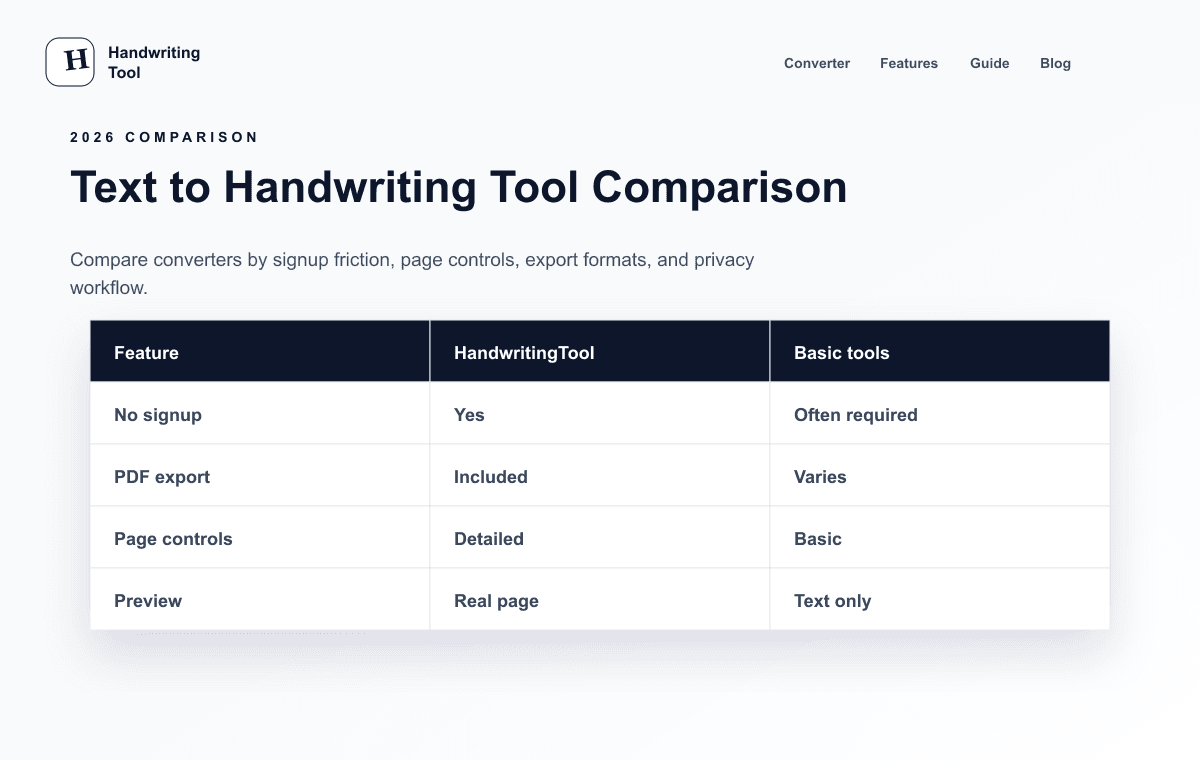
How to Read This Comparison
Text to handwriting software can look similar at first glance. Most tools let you type or paste text, choose a handwriting style, and export a page. The differences show up when you ask more specific questions:
- Do you need one quick page or a longer document?
- Do you need PDF, PNG, JPG, or SVG?
- Do you want preset handwriting styles or your own handwriting?
- Do you need English only, or support for Hindi and other scripts?
- Do you need live page preview, manual text placement, or document import?
- Do you want a free tool, a paid workflow, or an open-source project?
For writers, teachers, designers, and content creators, these differences matter. A novelist creating a fictional note has different needs from a teacher making a printable example sheet. A designer testing a packaging mockup may care about transparent images or SVG. A content creator making a social carousel may care more about speed and clean image export.
Comparison Table
This table summarizes the tools by practical fit rather than treating one option as universally better than the rest.
Feature and plan descriptions were rechecked against each linked product or project page on August 29, 2026. This is a documented feature comparison, not a laboratory test, and pricing or plan availability can change.
| Tool | Strength | Tradeoff | Pricing Model | Export Options | Best Use Case | | --- | --- | --- | --- | --- | --- | | HandwritingTool | Browser-local DOCX/PDF text import, page controls, transparent PNG | No OCR, formatting preservation, SVG, or custom handwriting training | Free | PDF, PNG, transparent PNG, JPG | Private editable document-to-handwriting pages | | WriteByHand.in | Hindi and English support, paper styles, PDF-focused output | Interface can feel busier if you only need one quick page | Free | HD PDF | Bilingual handwritten-style pages and teaching resources | | InkWritten | Document import, formatting preservation, images and tables | More workflow complexity; frequent use may require a paid plan | Free tier and paid plans | PDF, image | Longer document workflows with imported files | | Saurabh Daware Text to Handwriting | Open-source, classic converter, font upload | Archived project; older interface; not actively modernized | Free | Images, PDF | Developers, tinkerers, and simple open-source experiments | | HandWrite | Custom handwriting-style synthesis and SVG export | Better suited to personalized output than quick preset pages | Product/pricing may vary | SVG and other exports depending on workflow | Designers who need vector-friendly handwriting assets | | Conwrite | Focuses on turning text into your own handwriting | Requires a personal-handwriting workflow, so setup may take longer | Product/pricing may vary | PDF or image | Personal brand notes, creator assets, and custom handwriting output | | HandtextAI | Plan-based export choices and custom handwriting font options | Some export quality, paper, and font features may be plan-limited | Free and paid plan structure | ZIP, JPEG, PNG, PDF depending on plan | Users who want more style options and paid customization paths |
What Makes a Tool Worth Using?
The right text to handwriting tool should save time without making the output look careless. These are the criteria used in this comparison.
Realism
Realistic output is about more than the handwriting font. Good results come from natural line spacing, balanced margins, readable letter shapes, useful paper backgrounds, and export quality that holds up after download.
Workflow Speed
Some users want to paste text and export within minutes. Others want a richer workflow with document import, custom handwriting, or design controls. Faster is not always better, but unnecessary complexity can slow down simple projects.
Export Formats
PDF is useful for printable documents. PNG and JPG are useful for websites, social graphics, thumbnails, and previews. SVG can be valuable for designers who need scalable assets.
Layout Control
Automatic page generation works well for notes, letters, guides, and printable sheets. Manual layout tools are better when you need to place text blocks inside a specific visual composition.
Language and Script Support
English-only tools are enough for many workflows, but creators and teachers working with Hindi or other Indic scripts need a converter that handles those characters cleanly.
Cost and Limits
Free tools are often enough for occasional pages. Paid tools can make sense when they add document import, custom handwriting, higher export quality, more fonts, or recurring production features.
HandwritingTool
HandwritingTool is a browser-based converter focused on editable page creation. You can type or paste text, upload a modern DOCX, or extract selected pages from a text-based PDF before choosing a handwriting style and exporting PDF, PNG, transparent PNG, or JPG.
This tool is strongest when you want handwritten-style pages without building a complex project. It works well for writers creating fictional notes or personal drafts, teachers preparing example pages or worksheet snippets, designers making quick paper-style mockups, and content creators producing note-style visuals for posts or newsletters.
It is not the best option if you need OCR, original Word/PDF formatting preservation, custom handwriting trained from your own writing, vector SVG output, or manual control over many separate objects on a canvas. Its value is in private local processing, editable extracted text, page controls, and practical exports.
Pros
- Free browser workflow
- Simple paste, preview, and export process
- PDF, PNG, and JPG downloads
- True transparent PNG output
- Browser-local DOCX and selectable-text PDF extraction
- A4 and Letter multi-page output
- Useful paper and spacing controls
- Good fit for clean handwritten-style pages
- Works for quick writing, teaching, and content workflows
Cons
- No OCR for scanned PDFs or support for legacy
.doc - Does not preserve Word or source-PDF visual formatting
- Does not focus on custom handwriting training
- Less suitable for detailed graphic-design layouts with many movable elements
- Output realism still depends on choosing good spacing, paper, and font settings
Best Use Case
HandwritingTool is best for quickly creating readable handwritten-style pages from typed text, especially when you need a simple browser workflow and flexible PDF or image export.
WriteByHand.in
WriteByHand.in is useful when language support matters. Its public pages highlight English and Hindi conversion, multiple paper styles, spacing and margin controls, and HD PDF export. It also has related tools for several Indian-language workflows.
This makes it a strong option for teachers, bilingual creators, and anyone preparing handwritten-style resources in Hindi or English. If your work involves Devanagari text, matras, conjuncts, or language-specific formatting, a tool built with those scripts in mind can be more reliable than a basic English-first generator.
The tradeoff is that the experience may feel more specialized and PDF-centered. If you only want a single English note-style image, a simpler converter may feel faster. If you need bilingual output, WriteByHand deserves serious consideration.
Pros
- Free to use
- Supports Hindi and English workflows
- Includes ruled, blank, graph, and other paper-style controls
- HD PDF export is useful for print-ready pages
- Helpful for teachers and bilingual content creators
Cons
- Interface can feel feature-heavy for a quick one-page English output
- Export workflow is more PDF-focused than broad image-export focused
- Realism depends on script, font, spacing, and page choices
- Some pages use learning-resource examples, which may not match every professional workflow
Best Use Case
WriteByHand.in is best for bilingual handwritten-style pages, especially Hindi and English teaching resources, printable examples, and language-focused content.
InkWritten
InkWritten is positioned more like a document workflow tool than a simple converter. Its public page highlights Word import, formatting preservation, multiple handwriting styles, image and table support, and export as PDF or image.
That makes it interesting for users who already have content in document form. A teacher may want to convert a prepared resource. A writer may want to bring in a formatted draft. A content creator may need images and tables to stay organized in the final page. In those cases, document import can save time.
The downside is that more capability usually means more complexity. If your task is simply “paste five paragraphs and export a note-style page,” a lighter browser tool may be faster. InkWritten is more appealing when the input is already a structured file or when you need repeated conversions.
Pros
- Supports document import workflows
- Can preserve more formatting than a plain text box
- Handles images and tables
- Offers PDF and image export
- Useful for recurring production work
Cons
- More complex than a quick paste-and-export tool
- Free usage may be limited depending on current plan details
- Some features may require an account or paid tier
- Not necessarily the fastest option for simple one-page outputs
Best Use Case
InkWritten is best for users who need document import, formatting preservation, images, tables, and a more structured conversion workflow.
Saurabh Daware Text to Handwriting
Saurabh Daware's Text to Handwriting project is a classic open-source converter that many people in this category know. The GitHub repository shows it uses libraries such as html2canvas and jsPDF, and the repository is archived and read-only.
Its strengths are transparency and simplicity. Developers can inspect the source, learn from the implementation, fork the idea, or use it as a reference for basic page generation. It also includes common controls like font choices, paper styling, spacing, and PDF/image generation.
The limitation is age. Because the original project is archived, it should not be judged the same way as actively maintained commercial or modern web tools. It can still be useful, but the interface and output polish may not match newer tools.
Pros
- Free and open-source
- Useful for learning how text-to-handwriting generators work
- Includes basic page and font controls
- Supports image/PDF generation through web libraries
- Good reference project for developers
Cons
- Archived and read-only
- Older interface
- May require more manual tweaking for realistic output
- Not ideal if you want active product updates or modern support
Best Use Case
Saurabh Daware's tool is best for developers, makers, and tinkerers who want a classic open-source text-to-handwriting project rather than a polished current product.
HandWrite
HandWrite presents itself as a tool for transforming typed text into handwriting with controls such as speed, pressure, roughness, and vector SVG export. That makes it more interesting for design workflows than many basic page generators.
SVG export can matter a lot. Designers working on branding, packaging, UI mockups, posters, or scalable web assets may prefer vector output because it can be resized without losing quality. A standard PDF or JPG may be fine for print or social content, but SVG gives designers more flexibility.
The tradeoff is that a design-friendly handwriting tool may not be the fastest option for plain note-style pages. If you only need a quick lined-paper PDF, SVG and synthesis controls may be more than you need.
Pros
- Design-friendly emphasis
- SVG export is useful for scalable graphics
- Offers controls tied to handwriting feel, such as roughness or pressure
- Good fit for visual assets and creative mockups
Cons
- May be more specialized than casual users need
- Not primarily a simple notebook-page generator
- Pricing and workflow details should be checked before relying on it for production
- May require more experimentation to get the exact visual style
Best Use Case
HandWrite is best for designers and creators who need scalable handwriting-style assets, especially when SVG output matters more than a quick printable page.
Conwrite
Conwrite focuses on turning text into your own handwriting. This is a different goal from tools that provide preset handwriting styles. If you want brand-consistent or personal-feeling handwritten output, custom handwriting can be valuable.
For writers, this can be useful for character materials, personal letters, or special project pages. For content creators, it can help build a recognizable visual identity. For designers, it can create a more bespoke look than a shared handwriting font.
The obvious tradeoff is setup. Any tool that aims to reproduce your own handwriting usually needs samples, onboarding, or a personalization process. That can be worth it for repeat use, but it is slower than opening a free converter and exporting a page in minutes.
Pros
- Focuses on personalized handwriting
- Useful for creator identity and branded visuals
- Exports as handwritten PDF or image
- Strong fit for repeat creative workflows
Cons
- Setup can take longer than preset-font tools
- Less ideal for one-off quick outputs
- Personal handwriting workflows may require more trust and attention to privacy
- Pricing and availability should be checked for your use case
Best Use Case
Conwrite is best for creators and writers who want text rendered in a personal handwriting style and are willing to spend more time setting up that custom workflow.
HandtextAI
HandtextAI is another option for users who want a more plan-based handwriting generator. Its public information describes export options that can vary by plan, including ZIP, JPEG, PNG, and PDF, and it also references custom handwriting font features on higher tiers.
This can make sense when you want more style options or are willing to pay for better export quality, additional paper choices, or custom font support. It is less ideal if you want a completely frictionless free tool with every export format available immediately.
The benefit of a plan-based product is that it may offer more advanced or polished features over time. The downside is that you need to check which features are unlocked before building your workflow around it.
Pros
- Multiple export paths depending on plan
- Custom handwriting font options may be available
- Useful for users who want more style and quality controls
- Can fit recurring creative production
Cons
- Some exports, paper choices, fonts, or quality levels may be locked by plan
- Less simple than a fully free browser converter
- Requires checking current plan details before committing to a workflow
- May be more than casual users need
Best Use Case
HandtextAI is best for users who want a more feature-gated but customizable handwriting workflow and are open to paid plan options for better exports or custom fonts.
Which Tool Should Writers Choose?
Writers usually need speed, readability, and the right mood. For fictional notes, character letters, poetry drafts, planning pages, or printable writing prompts, HandwritingTool is a good fit because it keeps the process quick. Conwrite may be better if the handwriting needs to feel personal or recurring across a larger creative project. HandWrite may be better if the output needs to become part of a designed cover, poster, or visual brand asset.
Which Tool Should Teachers Choose?
Teachers often need clear output, printable formats, and language support. HandwritingTool works well for quick example pages, warm-up sheets, and note-style visuals. WriteByHand.in is stronger when Hindi, English, or related Indian-language resources are needed. InkWritten may be better when the source material already exists as a formatted document with images or tables.
Which Tool Should Designers Choose?
Designers should look closely at export format and layout control. HandWrite stands out when SVG matters. Conwrite can help when a personal handwriting style is part of the brand. HandwritingTool is useful for fast paper-style mockups, but it is not a full design editor. For finished design systems, a vector or custom-handwriting workflow may be more appropriate.
Which Tool Should Content Creators Choose?
Content creators often need a balance of speed and visual polish. HandwritingTool is useful for quick social graphics, quote pages, newsletter inserts, and handwritten-style images. HandtextAI may fit creators who want more paid customization. Conwrite may be worth exploring if a personal handwriting style becomes part of a channel or brand identity.
Final Recommendation
There is no single best text to handwriting tool for every person. The best choice depends on the job.
Choose HandwritingTool if you want fast, free, browser-based handwritten-style pages with PDF, PNG, and JPG export. Choose WriteByHand.in if bilingual Hindi and English output is important. Choose InkWritten if document import and formatting preservation matter. Choose Saurabh Daware's project if you want an open-source reference. Choose HandWrite if SVG and design-friendly output matter. Choose Conwrite if your own handwriting style is the priority. Choose HandtextAI if you want a plan-based tool with more customization paths.
For most writers, teachers, designers, and content creators, the best approach is to start with the workflow requirement, not the tool name. Decide whether you need speed, language support, document import, personal handwriting, vector output, or paid customization. Once that is clear, the right tool becomes much easier to choose.
Try HandwritingTool for quick browser-based pages
FAQs
Is HandwritingTool the best text to handwriting tool?
HandwritingTool is best for quick browser-based handwritten-style pages with PDF, PNG, and JPG export. It is not the best fit for every workflow. Other tools may be better for Hindi support, document imports, SVG output, or custom handwriting.
Which tool is best for teachers?
For quick printable examples, HandwritingTool is a practical choice. For bilingual Hindi and English materials, WriteByHand.in may be stronger. For imported documents with images or tables, InkWritten may be a better fit.
Which tool is best for designers?
Designers should consider HandWrite when SVG export and scalable handwriting assets matter. Conwrite may be useful for personal handwriting style. HandwritingTool is useful for quick mockups and paper-style visuals.
Are free text to handwriting tools enough?
Free tools are enough for many one-page notes, printable examples, drafts, and social visuals. Paid tools become more useful when you need custom handwriting, higher export quality, document imports, more styles, or recurring production features.
What makes handwritten output look realistic?
Realism comes from readable handwriting, natural line spacing, good margins, suitable paper backgrounds, and enough white space. The tool matters, but the settings you choose matter just as much.
Use the Converter Responsibly
HandwritingTool is best for readable notes, drafts, worksheets, examples, journal pages, printable resources, and document previews. Review your output carefully before printing or sharing it.