PDF & Export • May 3, 2026
Written by Anwar Fakhri
Anwar Fakhri founded and maintains HandwritingTool, and writes and edits its practical guides about handwriting conversion, page layout, printable documents, and responsible writing workflows.
Updated September 28, 2026. Each guide is reviewed for clarity, practical usefulness, and responsible page-creation workflows.
How to Export Handwritten Pages as a PDF
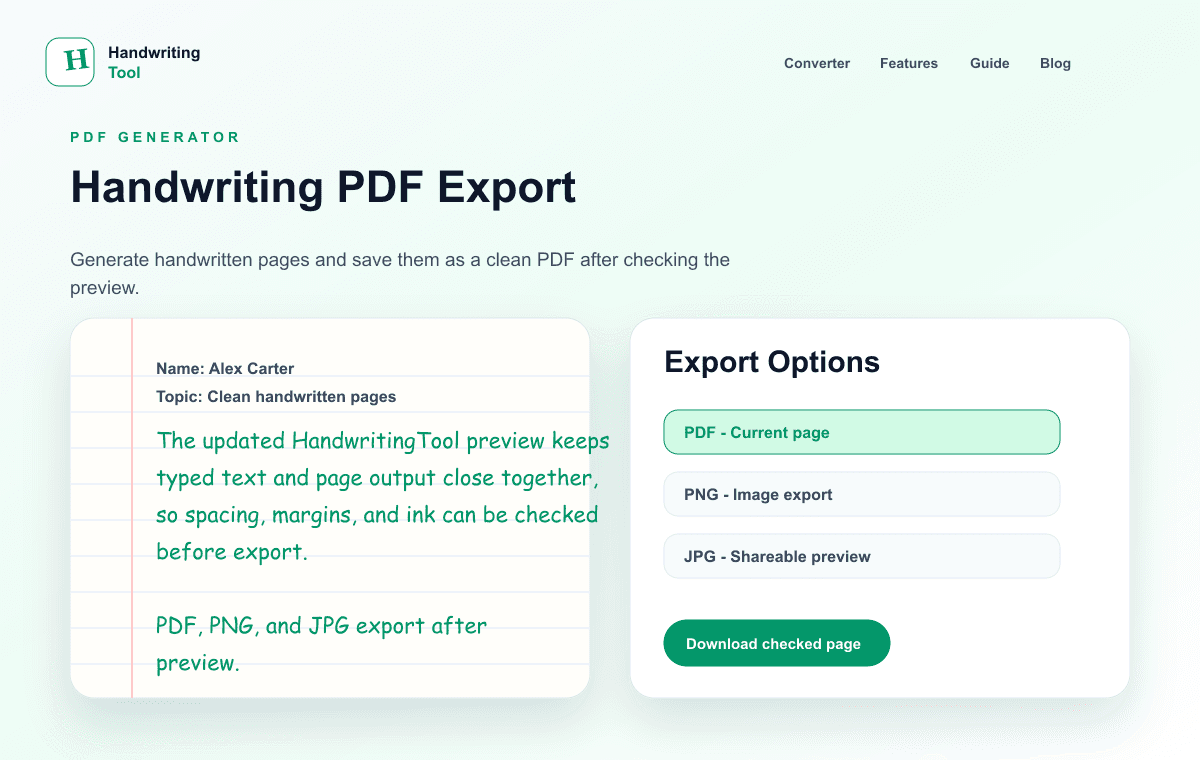
A text to handwriting PDF generator starts with text you type or paste, creates new handwritten-style pages, and saves those pages as a PDF. This output workflow is different from importing an existing source PDF.
PDF is different from a single image export. It keeps pages together, preserves layout, and usually prints more predictably. Margins, page size, line spacing, paper style, and handwriting scale stay consistent across devices. That makes PDF the best format when the handwritten-style output should behave like a document rather than a loose image.
This guide covers both directions: extracting text from an existing PDF, and the output stage — page size, preview, quality, multi-page export, printing, and the choice between PDF, PNG, and JPG.
If your content is currently inside a PDF, use the PDF upload tool to extract selectable text, edit it, and generate new pages. Import does not preserve the source PDF layout or run OCR, so scanned files still need separate OCR and proofreading. The extraction workflow is covered in its own section below; the rest of this article covers handwritten PDF output.
If you are new to the basic process, start with how to convert text to handwriting. Before printing, confirm the A4 page setup; for notebook pages, align the writing with the lined-paper workflow. If your content starts in Word, use the Word DOCX-to-handwriting workflow.
Starting From an Existing PDF? Extract the Text First
If your source material is already inside a PDF — a handout, an old assignment, a scanned chapter — extract and clean the text before rendering new handwritten pages. This input workflow has its own pitfalls, so work through it before jumping to the export steps.
First, identify the kind of PDF
PDFs that look similar on screen can store content very differently:
| PDF type | Quick test | What to do | |---|---|---| | Text-based | You can select individual words | Upload it to the PDF to handwriting converter, then clean the extracted text | | Scanned image | Dragging selects a page image, not words | Run OCR in a separate application first, then proofread | | Mixed document | Some text selects, some does not | Copy the selectable text and use OCR only where needed | | Complex layout | Text selects in the wrong order | Rebuild the reading order manually |
Extract and select the pages you need
- Open the PDF to handwriting converter and upload a text-based PDF up to 15 MB.
- Check the detected page count, then enter
all, a single page, a range such as1-3, or a list such as2,4,6. - Review the editable text that appears. The file is processed locally in your browser, and extraction can be cancelled if the file is too large.
OCR is only for scanned PDFs
A scanned PDF contains images, not text. Run it through OCR software first — Adobe Acrobat, Google Drive, and Microsoft OneNote all document text-recognition workflows — then proofread the result carefully. OCR is an estimate: check names, dates, numbers, and lookalike characters such as 0/O, 1/l, and 5/S before converting.
Clean the text before rendering
PDF extraction introduces errors that become more visible once the text is rendered as handwriting:
- Repair the reading order. Multi-column layouts may copy columns in the wrong sequence, and tables can scramble headings and cells. Reconstruct the intended order manually.
- Remove document furniture. Delete page numbers, repeated headers, footers, watermarks, and navigation labels unless they belong in the new page.
- Fix line breaks. Rejoin lines that were wrapped only by the original page width, and reconnect words split with end-of-line hyphens — but keep genuine hyphenated terms unchanged.
- Simplify unsupported structure. The converter renders plain text only: rewrite simple tables as labelled lines, and handle diagrams, equations, and footnotes separately.
Once the text is verified, continue with the export workflow in this guide — choose paper and page size, preview every page, and download one finished PDF.
What Is a Text to Handwriting PDF Generator?
A text to handwriting PDF generator is an online tool that takes typed text, renders it as handwriting-style pages, and exports those pages into a PDF file.
The workflow is usually:
- Paste or type your content
- Choose a handwriting style
- Select paper type and page size
- Adjust margins, font size, and spacing
- Preview the handwritten pages
- Download the result as PDF
The main advantage is layout stability. A PDF is designed to preserve page structure, which helps when you need to print, share, store, or import the file into a digital notebook.
Why PDF Export Matters
PDF export matters because handwritten-style pages often need to be used as complete documents. A PNG or JPG can work for one page, but a PDF keeps multiple pages together and makes them easier to manage.
PDF is especially useful for:
- Printing handwritten-style documents
- Archiving notes, drafts, and records
- Sharing one complete file
- Saving pages in digital notebooks
- Creating teacher worksheets or example pages
- Keeping page size and margins consistent
- Sending files without losing layout
- Creating personal letters or printable documents
If the final result should feel like a document, PDF is usually the safest choice.
Printing Use Cases
PDF is ideal for printing because it preserves paper size, page order, and margins. If you create handwritten-style notes, worksheets, recipe pages, journal inserts, or draft pages, PDF keeps the output predictable when printed.
For best results, choose the same page size in the tool that you plan to print. Use A4 if you print on A4 paper. Use Letter if you print on US Letter. Avoid changing page scale in the printer settings unless you intentionally want the page resized.
Archiving Use Cases
PDF is also useful for archiving. If you create handwritten-style drafts, meeting notes, planning pages, or printable records, a PDF is easier to store than separate image files.
Use clear file names such as:
journal-page-june-2026.pdfrecipe-card-cinnamon-rolls.pdfteacher-worksheet-example.pdfcreative-writing-note.pdfmeeting-notes-handwritten-style.pdf
Clear naming helps you find the document later, especially when you create many pages over time.
Sharing Use Cases
PDF works well for sharing because most devices can open it. A PDF keeps the page layout stable for the person receiving it. That matters when spacing, margins, and page order are part of the final presentation.
If you are sending a handwritten-style document to a colleague, friend, client, teacher, or collaborator, PDF is usually easier than sending several separate images.
Digital Notebook Use Cases
Many digital notebook apps can import PDFs. This makes a handwriting PDF useful for planners, reading notes, creative notebooks, teaching resources, and visual documentation.
After importing a handwritten-style PDF into a notebook app, you can often annotate it, highlight it, add comments, or keep it inside a larger digital binder. For this use case, stable page size matters. Choose a paper size that fits your notebook workflow before exporting.
How to Create a Handwritten PDF Online
Step 1: Prepare Clean Text
Start with edited text. Fix typos, remove repeated spaces, and split long paragraphs. PDF export preserves the layout, so any clutter in the source text will remain visible in the final document.
Step 2: Open the Converter
Open the HandwritingTool converter in your browser. Paste your content into the text area and review the first page preview.
Step 3: Choose a Handwriting Style
Pick a readable style. Decorative handwriting can work for short greeting lines or creative titles, but long documents need clear letterforms.
Step 4: Set Paper and Page Size
Choose lined, blank, or graph paper based on your use case. Select a page size that matches the final destination. A4 and Letter are common choices for printing and archiving.
Step 5: Adjust Margins and Spacing
Use margins that leave the page comfortable. Increase line spacing if the text feels crowded. Keep word spacing natural. A PDF with readable spacing is more useful than a PDF that squeezes too much text onto each page.
Step 6: Preview Every Page
Preview before downloading. Check for cut-off text, crowded lines, awkward page breaks, low contrast, or paragraphs that should be split.
Step 7: Download as PDF
When the preview looks right, export as PDF. Open the downloaded file and check that the page order, margins, and text quality match the preview.
Technical Tips for Best PDF Quality
Match Page Size to Output
Choose the page size you actually need. If you export as A4 and print on Letter, the printer may scale the page. Scaling can shift margins and make handwriting look smaller than expected.
Use Strong Contrast
Black ink gives the sharpest print result. Blue ink also prints well if the tone is dark enough. Avoid pale gray or low-contrast colors for documents that must remain readable.
Keep Font Size Readable
Tiny handwriting may look fine on screen but become difficult to read after printing or compression. Use medium size for most documents.
Avoid Overcrowded Pages
PDF preserves layout, but it cannot make crowded text easier to read. Split long content into more pages instead of forcing everything into a small space.
Preview at Print Scale
View the PDF at 100% or print-preview size. This helps you catch text that is too small or margins that are too narrow.
Prefer PDF for Multi-Page Output
If your handwritten content spans several pages, PDF is usually better than downloading each page as an image. It keeps everything in one file and preserves order.
Check Compression
Some platforms compress uploaded files. If handwriting becomes blurry after sharing, try using PDF or PNG instead of JPG, and avoid unnecessary re-exporting.
PDF vs PNG vs JPG
Each export format has a different job.
| Format | Best For | Strength | Tradeoff | | --- | --- | --- | --- | | PDF | Printing, archiving, sharing, digital notebooks, multi-page documents | Stable layout and page order | Less convenient for quick image placement | | PNG | Design work, social graphics, high-quality single-page previews | Sharp image quality | Larger file size than JPG | | JPG | Quick sharing, smaller previews, lightweight files | Smaller file size | Compression can soften handwriting details |
Use PDF when the output should act like a document. Use PNG when the output should act like a high-quality image. Use JPG when file size matters more than crisp text.
Best PDF Settings by Use Case
| PDF Use Case | Paper | Ink | Size | Spacing | Tip | | --- | --- | --- | --- | --- | --- | | Printable notes | Lined | Blue or black | Medium | Slightly open | Check print preview | | Teacher worksheet | Blank or lined | Black | Medium-large | Open | Keep instructions readable | | Journal archive | Lined or blank | Blue | Medium | Open | Use clear file names | | Digital notebook | Blank or lined | Black or blue | Medium | Normal | Match notebook page size | | Letter document | Blank | Black | Medium | Open | Use wider margins | | Recipe page | Blank | Black | Medium | Normal | Split ingredients and steps |
Common PDF Mistakes to Avoid
Exporting Without Previewing
Always preview before downloading. PDF preserves layout, so layout problems are carried into the final file.
Using Low Contrast Ink
Light ink can look stylish on screen but weak after printing. Use strong blue or black for most documents.
Choosing the Wrong Page Size
Page size affects printing and digital notebook imports. Pick the size that matches the final use.
Making Text Too Dense
Dense handwritten PDFs are hard to read. Add line breaks, headings, and more pages when needed.
Re-Exporting Too Many Times
Repeated conversion can reduce quality, especially if a PDF is turned into an image and back into a PDF. Export once in the format you need.
Who Should Use a Text to Handwriting PDF Generator?
A PDF generator is useful for writers, teachers, designers, content creators, professionals, journal keepers, and everyday users who need handwritten-style pages as stable documents.
Writers can archive creative notes and fictional letters. Teachers can prepare printable worksheet examples. Designers can save presentation-ready page mockups. Content creators can create downloadable resources. Professionals can store meeting notes, personal documents, and draft pages in an organized format.
FAQs
Can I convert text to handwriting and download as PDF?
Yes. Paste your text into a handwriting generator, adjust the page settings, preview the output, and download the handwritten-style pages as a PDF.
Is PDF better than PNG for handwritten pages?
PDF is better for printing, archiving, sharing complete documents, and keeping multiple pages together. PNG is better for sharp single-page images and design assets.
What paper style is best for handwritten PDFs?
Lined paper works well for notes and drafts. Blank paper works well for clean documents, letters, recipe pages, and design mockups. Graph paper works well for structured pages.
How do I make a handwritten PDF look sharp?
Use readable font size, strong contrast, natural spacing, correct page size, and PDF export. Avoid low-contrast ink and crowded paragraphs.
Can I use handwritten PDFs in digital notebooks?
Yes. Many digital notebook apps can import PDFs, making the format useful for planners, notes, worksheets, journal pages, and archived documents.
Final Thoughts
A text to handwriting PDF generator is useful when handwritten-style output needs to behave like a real document. PDF is best for printing, archiving, sharing, and digital notebook workflows because it preserves page size, margins, order, and layout.
For best results, prepare clean text, use readable handwriting, choose the right paper size, keep strong contrast, preview every page, and export once in the format that fits your work.
Use the main text-to-handwriting converter to create handwritten-style PDF pages from typed text. Use the separate PDF-to-handwriting tool only when your source content is already inside a selectable-text PDF.
Use the Converter Responsibly
HandwritingTool is best for readable notes, drafts, worksheets, examples, journal pages, printable resources, and document previews. Review your output carefully before printing or sharing it.