May 14, 2026
Written and edited by Anwar
Anwar founded HandwritingTool and edits the site's guides on handwriting conversion, page layout, printable documents, and writing workflows.
Updated May 17, 2026. Each guide is reviewed for clarity, practical usefulness, and responsible page-creation workflows.
Handwriting Text: Convert Typed Text into Realistic Handwriting Online
Handwriting text is typed content that has been converted into a handwritten-style page. Instead of showing plain computer text, the output looks like it was written by hand with natural letter shapes, spacing, ink color, and paper layout.
This is useful when you want typed notes, study material, paragraphs, worksheets, or document formats to feel more personal and notebook-like. A good handwriting text converter should do more than change the font. It should help you create a full page with readable handwriting, margins, paper style, preview, and export options.
In this guide, you will learn what handwriting text means, how it is different from a basic font generator, how to convert typed text into handwriting online, and which settings make the final page look clean and realistic.
If you want the direct tool, open the free HandwritingTool converter. If you want the broader beginner workflow, read how to convert text to handwriting. If your content is typed study material, use how to make typed notes look handwritten online.
What Is Handwriting Text?
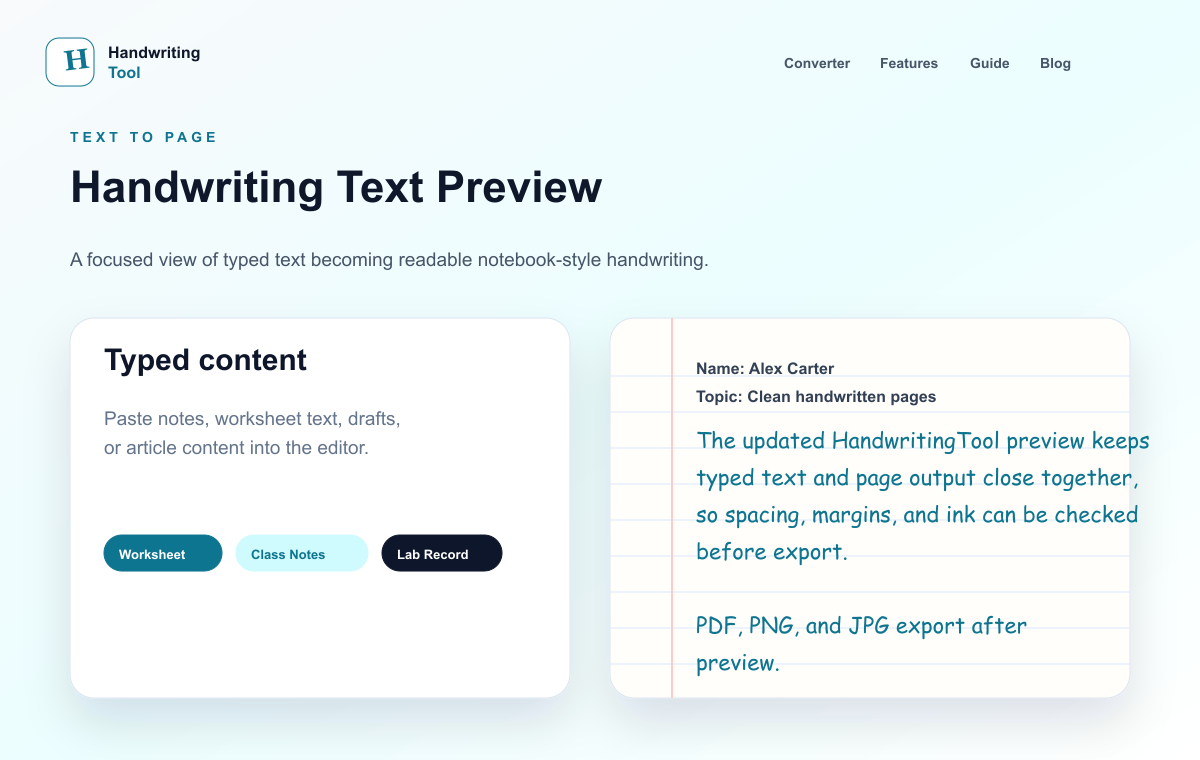
Handwriting text means digital text that appears in a handwriting-style format. You type or paste normal text, then a converter renders it as handwritten output.
The best result usually includes:
- A readable handwriting style
- Blue, black, or dark gray ink
- Lined, blank, or graph paper
- Natural font size
- Balanced line spacing
- Comfortable margins
- Page preview before download
- PDF, PNG, or JPG export
The goal is not only to make letters look handwritten. The full page should also feel organized, readable, and practical.
For a page-focused explanation, see create handwritten pages online free. For a generator-focused explanation, see handwritten text generator.
Handwriting Text vs Handwritten Text Generator
People often use the phrases "handwriting text" and "handwritten text generator" for similar searches, but the intent can be slightly different.
"Handwriting text" usually describes the final output: typed words turned into handwriting-style text or pages.
"Handwritten text generator" usually describes the tool: the online converter that creates that output.
Both ideas connect to the same workflow:
- Prepare typed text.
- Paste it into a handwriting converter.
- Choose a handwriting style.
- Adjust paper, spacing, margins, and ink.
- Preview the page.
- Download the handwriting text as PDF or image.
If you only need a decorative sentence, a simple font generator may be enough. If you need a complete handwritten-style page, use a page-based converter with export controls.
How to Convert Typed Text into Handwriting Text
For a cleaner workflow, start with how to convert text to handwriting, compare the related guide on handwritten text generator, and use create handwritten pages online free when you need the next step. You can create handwriting text online in a few simple steps.
Step 1: Prepare Your Typed Text
Start with clean content. Fix spelling, remove extra spaces, and split long blocks into shorter paragraphs. Handwriting text looks more realistic when the source text is organized.
Before pasting, check:
- Are the paragraphs too long?
- Do you need headings?
- Is the text final enough to export?
- Are there repeated lines or extra spaces?
- Will the page be easier to read with shorter sections?
Clean input creates cleaner handwritten output.
Step 2: Open the Handwriting Converter
Open the text to handwriting converter. Paste your typed text into the input box and wait for the live preview.
The preview helps you check the page before downloading. This matters because handwriting text can look very different depending on font size, line spacing, margins, and paper type.
Step 3: Choose a Readable Handwriting Style
Choose a handwriting style that matches the purpose of the page. For notes and study pages, readable handwriting is better than decorative handwriting. Fancy cursive can look attractive, but it may become hard to read across a full page.
Good handwriting text should have:
- Clear letters
- Natural spacing
- A steady baseline
- No extreme slant
- Good readability in paragraphs
If you are choosing a style for school-style output, read best handwriting fonts for study pages.
Step 4: Select Paper and Ink
Paper style changes the feeling of the page.
Lined paper is best for notes, paragraphs, structured note pages, and notebook-style pages. If you want this look, read text to handwriting on lined paper.
Blank paper is better for letters, short pages, title pages, and clean documents.
Graph paper is useful for lab notes, calculations, structured examples, and technical layouts.
For ink color, blue and black are usually safest. Blue ink feels natural for notes-style pages. Black ink works well for clean printable documents.
Step 5: Adjust Font Size and Spacing
Font size and spacing are the biggest quality controls for handwriting text.
If the font is too large, the page can look childish or crowded. If it is too small, the page can become hard to read. Medium size usually works best.
Line spacing should feel open enough for readability but not so wide that the page looks empty. Word spacing should feel natural, not stretched.
Start with moderate settings, then use the preview to adjust.
Step 6: Preview the Full Page
Do not download immediately. Preview the full page first.
Look for:
- Text too close to the edge
- Crowded lines
- Paragraphs that need breaks
- Font size that feels too large or small
- Ink color that prints poorly
- Page balance problems near the bottom
If the page feels crowded, shorten paragraphs or reduce font size slightly. If it feels empty, adjust spacing or margins.
Step 7: Download as PDF, PNG, or JPG
When the handwriting text looks clean, download it in the format you need.
PDF is best for printing, saving, and multi-page handwritten documents. PNG is best for a clear single-page image. JPG is useful when you want a smaller image file.
For export details, use the text to handwriting PDF generator guide.
Best Settings for Realistic Handwriting Text
These settings are a good starting point for most pages:
| Setting | Recommended Choice | | --- | --- | | Paper type | Lined paper for notes, blank paper for clean pages | | Ink color | Blue or black | | Font size | Medium | | Line spacing | Normal or slightly open | | Word spacing | Natural, not stretched | | Margins | Left margin and enough top space | | Export format | PDF for final documents |
The most important rule is balance. Real handwriting is readable, not overly perfect. Keep the layout simple and check the preview before exporting.
For a deeper realism checklist, read how to make handwriting look realistic online.
Common Uses for Handwriting Text
Handwriting text can be useful in many workflows:
- Study notes
- Revision summaries
- Printable notebook pages
- Worksheet examples
- Draft pages
- Personal letters
- Practice documents
- Structured note pages
For study-focused pages, read the handwritten notes generator guide. For full page formatting, read create handwritten-style notes and worksheets online.
For a quick note-specific process, see how to make typed notes look handwritten online.
Use handwriting text output for notes, drafts, examples, documents, and visual pages. Keep the content accurate, preview the page carefully, and choose settings that make your work readable.
Handwriting Text on Mobile
You can create handwriting text on a phone as long as the converter works well on mobile. The basic workflow is the same:
- Type or paste your content.
- Choose a style.
- Select paper and ink.
- Preview the page.
- Download the file.
Mobile is especially useful when your content is already in notes, messages, Google Docs, or another writing app. Copy the text, paste it into the converter, and preview the output before exporting.
If your goal is a mobile study page PDF, read how to make a handwritten study page PDF on mobile.
Handwriting Text from Word or PDF
If your text is already in Microsoft Word or Google Docs, copy the text first, then paste it into the converter. This gives you control over the final handwritten page without uploading a document.
For that workflow, use Word to handwriting converter online free.
If your content starts in a PDF, copy or extract the text first. Clean the text, remove headers or footers if needed, then paste it into the handwriting converter. For details, read the PDF to handwriting converter guide.
Mistakes to Avoid
The most common mistake is pasting one large block of text. Handwritten pages look better when the content has short paragraphs and clear spacing.
Avoid:
- Very long paragraphs
- Overly decorative handwriting styles
- Tiny font size
- Too much line spacing
- Margins that are too narrow
- Bright ink colors
- Downloading before previewing
- Ignoring the final PDF check
Good handwriting text should be easy to read first. Realism comes from clean layout, natural spacing, and sensible settings.
FAQs
What does handwriting text mean?
Handwriting text means typed text converted into handwriting-style output. It can be a short handwritten-style text or a full page with paper, spacing, margins, and export options.
Can I convert typed text into handwriting online?
Yes. You can use the free HandwritingTool converter to paste typed text, choose a handwriting style, preview the page, and download it as PDF, PNG, or JPG.
What is the best paper style for handwriting text?
Lined paper is best for notes and notebook-style pages. Blank paper is best for clean documents or letters. Graph paper is useful for lab notes, math, and structured content.
Can I download handwriting text as PDF?
Yes. PDF is usually the best format for final handwritten-style documents because it keeps the page layout stable and is easy to print or share.
How do I make handwriting text look realistic?
Use a readable handwriting style, medium font size, natural spacing, blue or black ink, proper margins, and short paragraphs. Always preview the full page before downloading.
Is handwriting text free to create?
Yes. You can create handwriting text for free with HandwritingTool and download the result in common formats.
Final Thoughts
Handwriting text is a practical way to turn typed content into readable handwritten-style pages. The best results come from a complete page workflow: clean text, a readable handwriting style, natural spacing, realistic paper, proper margins, and a careful preview.
Start with simple settings, keep the content organized, and choose PDF when you need a final printable document.
Use the Converter Responsibly
HandwritingTool is best for readable notes, drafts, worksheets, examples, journal pages, printable resources, and document previews. Review your output carefully before printing or sharing it.