June 1, 2026
Written by Anwar, Founder of HandwritingTool
Practical guidance from the team behind HandwritingTool, focused on helping students and everyday users create clear handwritten-style pages faster.
Updated June 1, 2026. Use the tool only for notes, drafts, worksheets, examples, and formats allowed by your instructions.
A4 vs Letter Paper Size: Which Is Better for Notes and Assignments?
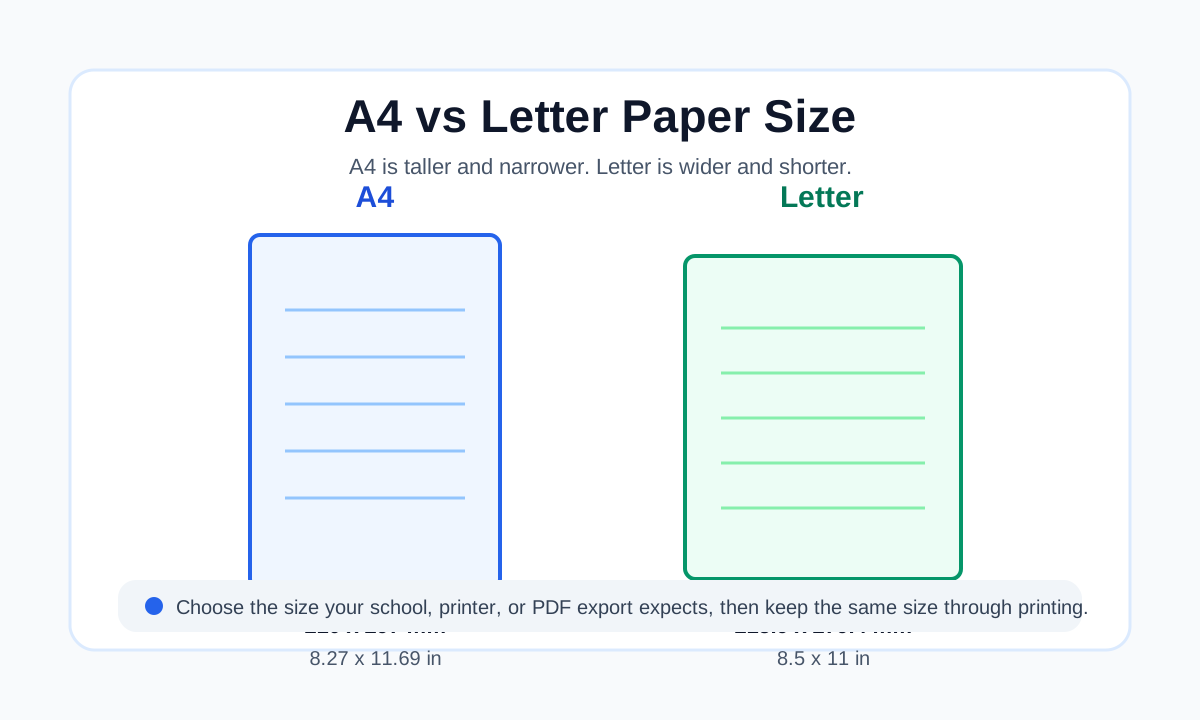
A4 and Letter are the two paper sizes most students notice when they print notes, download worksheets, create PDFs, or submit assignments. They look almost the same at first, but they are not identical. A4 is slightly taller and narrower, while US Letter is slightly wider and shorter.
For most notes and assignments, the best paper size is the one your school, teacher, printer, or country expects. Use A4 if you are outside North America or your instructions mention A4. Use Letter if you are in the United States or Canada, or if your assignment instructions ask for Letter size. If no size is required, A4 is usually better for international use, while Letter is usually better for US classroom printing.
Quick Answer
Choose A4 for notes and assignments if you live in a country where A4 is the standard paper size. This includes most of Europe, Asia, Africa, Australia, and many international schools. A4 also works well when you want a little more vertical space for notes.
Choose Letter if you are in the United States, Canada, or a school system that uses US-style document formatting. Letter size is common for classroom handouts, office documents, and printed assignments in North America.
For assignments, the rule is simple: follow the required format first. If your teacher asks for A4, use A4. If the instruction says Letter, use Letter. If the instruction only says PDF, choose the size that matches your printer or the format normally used by your school.
A4 vs Letter Size Comparison
| Paper Size | Millimeters | Inches | Best For | | --- | --- | --- | --- | | A4 | 210 x 297 mm | 8.27 x 11.69 in | International notes, school assignments, printable study pages | | Letter | 215.9 x 279.4 mm | 8.5 x 11 in | US and Canada schoolwork, office printing, classroom handouts |
The difference is small, but it matters when a document has tight margins, page borders, lined paper, graph paper, tables, or content near the bottom of the page.
A4 is taller, so it gives more vertical space. Letter is wider, so it gives slightly more horizontal room. When you switch between the two without adjusting the layout, text can move, margins can look uneven, and the bottom or side of the page can be clipped during printing.
What Is A4 Paper Size?
A4 is an international paper size used in many countries for schoolwork, office documents, forms, letters, worksheets, and printable study material. Its size is 210 x 297 mm, or about 8.27 x 11.69 inches.
A4 belongs to the ISO A-series paper system. One practical advantage of this system is that the sizes scale neatly. For example, A3 is twice the size of A4, and A5 is half the size of A4. This makes A4 useful for printing, copying, scanning, and reducing or enlarging documents.
For students, A4 is a strong default when:
- Your school or country normally uses A4
- You are creating printable notes for international use
- You want a standard academic page size
- You need a little more height for paragraphs
- You are exporting study pages as PDF
- You are not sure where the page will be printed
If you create handwritten-style pages online, A4 is often a good choice for notebook-style pages because the page feels familiar and has enough vertical room for longer notes.
What Is Letter Paper Size?
Letter paper, often called US Letter, is the standard paper size used for many documents in the United States and Canada. Its size is 8.5 x 11 inches, or 215.9 x 279.4 mm.
Letter paper is slightly wider than A4 but not as tall. It is common in schools, offices, home printers, forms, worksheets, and everyday documents across North America.
Letter is the better choice when:
- Your teacher or institution asks for Letter size
- You are printing in the United States or Canada
- Your home printer is loaded with Letter paper
- Your worksheet or PDF template was designed for Letter
- You are using US-style margins, such as 1 inch on each side
- Your audience is mainly in North America
If your page is designed for Letter and you print it on A4 without checking settings, the layout may still print, but the margins and spacing can change.
Which Is Better for Notes?
For personal notes, both A4 and Letter work well. The better choice depends on where you will print or store the notes.
A4 is usually better for study notes when you want more vertical writing space. It gives a little more room for headings, bullet points, summaries, and longer paragraphs. If you are making revision sheets or printable study pages, A4 can feel slightly more spacious.
Letter is usually better if your folders, binders, printer paper, and classroom materials are already Letter size. If everything around you is Letter, using A4 may create small printing or storage problems.
For handwritten-style notes, the page size also affects how the output feels. A4 can fit more lines, while Letter may make the page feel a little wider. If you are using lined paper handwriting, keep the paper size consistent from the editor to the final PDF.
Which Is Better for Assignments?
For assignments, do not choose based only on preference. Choose based on the instruction.
Use A4 if the assignment brief, school portal, exam board, or teacher says A4. Use Letter if the instructions say Letter, 8.5 x 11, or US Letter. If the assignment is digital and no paper size is mentioned, choose the size your school normally uses.
Assignments often have formatting rules. These can include:
- Paper size
- Margins
- Font size
- Line spacing
- Page count
- Header or footer placement
- File format
- Print or upload requirements
Paper size can affect page count. The same essay may flow differently on A4 and Letter because the page height and width are different. If your assignment has a strict page limit, set the correct paper size before writing or exporting the final PDF.
If you are preparing a permitted handwritten-style study page or worksheet, read create handwritten pages online free for the full page-making workflow.
Why Printing Problems Happen
Printing problems happen when the document size, PDF size, printer paper, and print settings do not match.
For example, if you create an A4 PDF but print it on Letter paper, the page may be too tall for the sheet. Your printer or PDF viewer may shrink the page automatically, or it may cut off content near the bottom. If you create a Letter PDF and print it on A4, the page may have different side spacing or extra room at the bottom.
Common symptoms include:
- Text cut off at the bottom
- Uneven margins
- Smaller-than-expected text
- Lined paper not matching the writing position
- Graph paper squares looking slightly resized
- Page borders not printing correctly
- Tables moving to the next page
- Header or footer getting too close to the edge
This is why paper size matters more for printable notes than it does for plain text on a screen.
Best Margin Settings for Notes and Assignments
Margins give the content enough space from the edge of the paper. They also help prevent printers from cutting off text.
For normal assignments, 1 inch margins are common in US-style documents. For A4 documents, many people use margins around 20 to 25 mm. Your teacher's instruction should always come first.
For printable notes, keep margins comfortable. Notes often need room for headings, page numbers, diagrams, or later annotations. Very narrow margins can make the page look crowded and may cause printing problems.
For handwritten-style pages, margins are especially important because the page should look natural. A little left margin makes notes feel more like a real notebook page. If you are making a text to handwriting PDF, preview the final page before downloading.
PDF Export Tips
PDF is usually the best format for notes and assignments because it keeps the layout more stable than a normal editable document. But PDF only helps if the page size is set correctly before export.
Use this checklist before exporting:
- Choose A4 or Letter before final formatting.
- Keep the same size in the editor, document, or generator.
- Preview the full page before export.
- Download or save as PDF.
- Open the PDF once and check the page.
- Print one test page if the document is important.
- In the print dialog, confirm the paper size.
- Avoid changing scale unless you need to fit a different paper size.
If you use the wrong size at the end, your page may still open correctly, but it may not print the way you expected.
A4 vs Letter for Handwritten-Style Pages
Handwritten-style pages need more care than plain documents because the page background, line spacing, margins, and text placement all work together.
Use A4 for handwritten-style pages when:
- Your notes are for an international audience
- Your school normally uses A4
- You want more vertical writing space
- You are making printable study pages
- Your final PDF will be printed on A4 paper
Use Letter when:
- You are printing in the United States or Canada
- Your teacher asks for Letter size
- Your home printer is loaded with Letter paper
- Your binder or folder is Letter size
- Your PDF template was made for Letter
If you are using HandwritingTool, choose the paper size that matches your final print setup. Then check the preview before downloading. This is especially important for lined and graph paper because the background can make scaling problems more obvious.
A4 vs Letter for Lined Paper
Lined paper depends on spacing. If you create a lined page in one size and print it on another, the writing may still appear, but the overall page can feel slightly off.
A4 lined pages are useful for longer notes, study summaries, and school-style pages. Letter lined pages are useful for US classroom materials and binder-friendly notes.
Whichever size you choose, avoid putting important text too close to the bottom edge. Printers often have non-printable margins, and the bottom edge is a common place for clipping.
For more detail, read the guide on text to handwriting on lined paper.
A4 vs Letter for Graph Paper
Graph paper is less forgiving than plain paper because the grid makes scaling changes easier to notice. If a graph paper PDF is resized during printing, the squares may become slightly smaller, larger, or uneven compared with what you expected.
For math notes, formulas, lab records, and structured study pages, match the PDF size to the physical paper size. Use A4 graph paper if you will print on A4. Use Letter graph paper if you will print on Letter.
If you are creating structured notes, the graph paper handwriting generator guide explains when graph paper is better than lined paper.
Common Mistakes to Avoid
The first mistake is assuming A4 and Letter are the same. They are close, but the difference can affect printing.
The second mistake is formatting the page at the end. Paper size should be chosen before final layout, especially if you have tables, page limits, borders, or handwritten-style backgrounds.
Avoid these mistakes:
- Creating the document in A4 but printing on Letter without checking
- Creating the document in Letter but submitting where A4 is required
- Ignoring teacher or school formatting instructions
- Using very narrow margins
- Placing important content near the bottom edge
- Exporting a PDF before previewing the full page
- Printing many copies before testing one page
- Using fit-to-page without checking the result
Small paper-size errors are easy to fix early and annoying to fix after the document is complete.
Best Choice by Situation
| Situation | Best Choice | | --- | --- | | School requires A4 | A4 | | School requires Letter | Letter | | Printing in the US or Canada | Letter | | Printing in most other countries | A4 | | International PDF sharing | A4 or provide both | | Personal study notes | Use the size your printer and folder support | | Handwritten-style study pages | Match the tool, PDF, and printer paper size | | Strict assignment page limit | Use the required size before writing |
If you are creating materials for other people, the most helpful option is to provide both A4 and Letter versions. If you are only making pages for yourself, choose the size you can print easily.
FAQs
Is A4 the same as Letter size?
No. A4 and Letter look similar, but they are different sizes. A4 is 210 x 297 mm, while Letter is 8.5 x 11 inches. A4 is taller and narrower. Letter is wider and shorter.
Which paper size is better for assignments?
The better paper size is the one required by your teacher, school, or institution. If there is no rule, use the size normally used in your country or school.
Which paper size is better for notes?
A4 is often better for longer study notes because it has more vertical space. Letter is better if you are in the United States or Canada and your printer, binder, and classroom materials use Letter size.
Can I print A4 on Letter paper?
Yes, but you should check the print preview. An A4 page is taller than Letter paper, so the printer may shrink the page or cut off content if the settings are wrong.
Can I print Letter on A4 paper?
Yes, but the margins may look different because Letter is wider and shorter than A4. Use print preview and test one page before printing many copies.
Should I use fit to page?
Use fit to page only when you need to print a document on a different paper size. It can prevent clipping, but it may also shrink the content. For precise notes, graph paper, or lined paper, matching the correct paper size is better.
What paper size should I use for handwritten-style notes?
Use the paper size you will actually print on. If you will print on A4, create and export the handwritten-style page as A4. If you will print on Letter, create and export it as Letter.
Is A4 better than Letter?
A4 is not always better, and Letter is not always better. A4 is better for international use and many school systems. Letter is better for US and Canada printing. The right choice depends on your instructions and printer.
Final Thoughts
A4 and Letter are close enough to confuse people, but different enough to affect notes, assignments, PDFs, and printing. A4 gives more height and is the international standard in many places. Letter is wider, shorter, and standard in the United States and Canada.
For assignments, follow the required format. For notes, use the size that matches your printer, folder, and study workflow. For handwritten-style pages, keep the same paper size from the tool to the PDF to the printer.
If you want to create printable handwritten-style study pages, open HandwritingTool, choose the right page size, preview the full page, and export only when the layout looks clean.
Use the Converter Responsibly
HandwritingTool is best for readable notes, drafts, worksheets, examples, printable study material, and permitted handwritten-style page formats. If original handwriting is required, follow that rule.